Book your flight with
One skill file connects your agent to AIsa.one — social data, financials, search, prediction markets, AI models, even flight booking — payable in USDC with x402 on Arc. No API keys. No seed phrases.
"Connect to AIsa.one using https://aisa.sh/skill.md"
Paste the command
Drop the line above into your agent's chat. It tells the agent where the skill lives.
Agent reads the skill
The skill teaches it to set up a Circle wallet, discover AIsa endpoints, and pay per call.
Pay per use in USDC
Every API call settles over x402 on Arc — typically $0.10. You approve spending first.
See it in action
A real Muse session: "I want to fly from SFO to LGA tomorrow" → 119 live offers back in seconds. The $0.10 search settled in USDC over x402 — no card, no checkout.
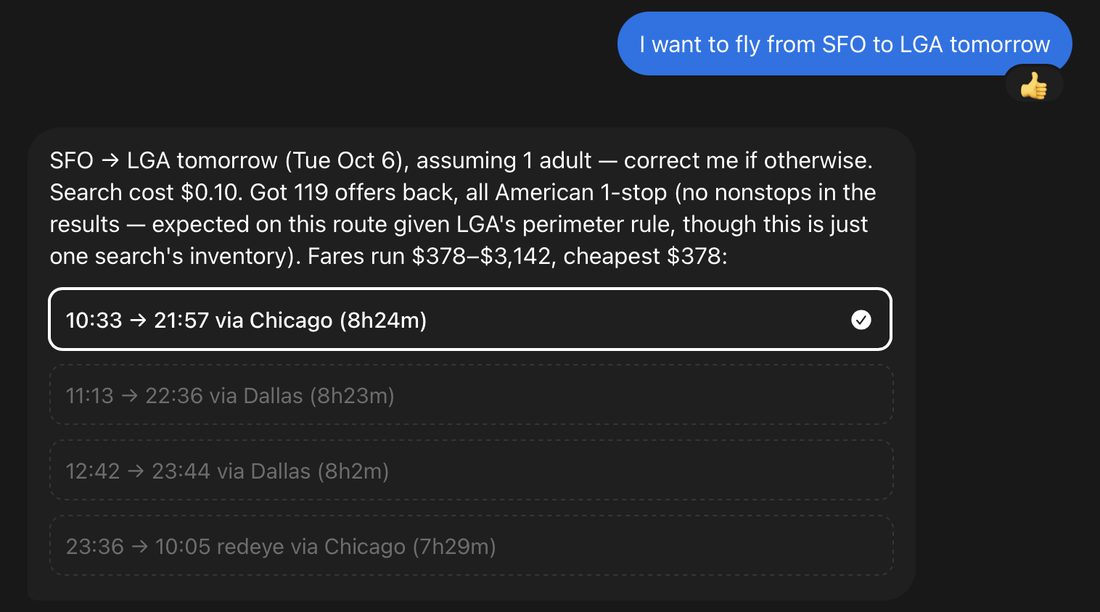
Actual screenshot from a Muse chat · SFO → LGA, Oct 6
Instructions by agent
Muse
Muse is Meta's personal AI agent (muse.ai). It picks up skills automatically from chat — just paste the command.
- Copy the command above.
- Paste it into your Muse chat (web, iOS, Android, or Mac app).
- Muse reads
https://aisa.sh/skill.md, installs the Circle CLI, and walks you through wallet login and funding — asking your approval before anything is spent.
Claude Code
Install the skill file into Claude Code's skills directory, then invoke it by name or paste the command.
- Run the commands above in your terminal.
- Start a new Claude Code session so it discovers the skill.
- Ask:
"Connect to AIsa.one using https://aisa.sh/skill.md"— or trigger it any time with/buy-aisa-x402.
.claude/skills/buy-aisa-x402/ inside your repo instead.Codex
Codex follows the open Agent Skills standard — drop the SKILL.md into its skills directory.
- Run the commands above in your terminal.
- Restart Codex so it picks up the new skill (it auto-discovers
~/.codex/skillsand.agents/skills). - Ask:
"Connect to AIsa.one using https://aisa.sh/skill.md"— or invoke explicitly with$buy-aisa-x402.
Cursor
Cursor reads SKILL.md natively — install it globally or per project.
- Run the commands above in your terminal.
- Restart Cursor so it discovers the skill (it also reads
.agents/skillsand.claude/skills). - Ask:
"Connect to AIsa.one using https://aisa.sh/skill.md".
.cursor/skills/buy-aisa-x402/ inside your repo instead.GitHub Copilot
Copilot CLI installs skills straight from a URL — one command.
- Run the command above in your terminal.
- Verify with
copilot skill list. - Ask:
"Connect to AIsa.one using https://aisa.sh/skill.md".
~/.copilot/skills/buy-aisa-x402/SKILL.md (personal) or .github/skills/buy-aisa-x402/SKILL.md (project).Windsurf
Windsurf's Cascade agent reads SKILL.md from its skills directory.
- Run the commands above in your terminal.
- Restart Windsurf so Cascade picks up the skill.
- Ask:
"Connect to AIsa.one using https://aisa.sh/skill.md".
Gemini CLI
Google's terminal agent follows the Agent Skills standard.
- Run the commands above in your terminal.
- Start a new Gemini CLI session.
- Ask:
"Connect to AIsa.one using https://aisa.sh/skill.md".
opencode
The open-source terminal coding agent with native skill support.
- Run the commands above in your terminal.
- Restart opencode so it discovers the skill.
- Ask:
"Connect to AIsa.one using https://aisa.sh/skill.md".
Cline
Cline reads SKILL.md natively once skills are enabled.
- Download the file with the command above, then move it into Cline's skills folder.
- Enable skills in Cline under Settings → Features → Enable Skills.
- Ask:
"Connect to AIsa.one using https://aisa.sh/skill.md".
.claude/skills/, so a Claude Code install covers Cline too.OpenClaw
OpenClaw auto-discovers skills placed in its workspace skills folder.
- Run the commands above in your terminal.
- Restart the OpenClaw gateway so it reloads skills.
- Message your agent:
"Connect to AIsa.one using https://aisa.sh/skill.md".
Hermes
Hermes (by Nous Research) is a skills-based agent — it learns reusable procedures from skill documents.
- Paste into your Hermes session:
"Connect to AIsa.one using https://aisa.sh/skill.md". - Hermes reads the skill and follows it: Circle wallet setup, endpoint discovery, x402 payment.
- Once it has run the flow, Hermes can persist it as a reusable skill for future sessions.
Instinct
Point your Instinct agent at the skill with the universal onboarding command.
- Paste into your agent:
"Connect to AIsa.one using https://aisa.sh/skill.md". - The agent reads the skill file and follows the setup: Circle CLI, wallet login, funding, then pay-per-call x402 purchases.
- Approve wallet funding and each purchase when the agent asks.
Kilo Code
Kilo Code is a VS Code-native autonomous agent — connect it with the onboarding command.
- Paste into Kilo Code's chat:
"Connect to AIsa.one using https://aisa.sh/skill.md". - Kilo reads the skill and follows the setup: Circle CLI, wallet login, funding, then pay-per-call x402 purchases.
- Approve wallet funding and each purchase when Kilo asks.
Kiro
Kiro (by AWS) is an agentic IDE — onboard it with the universal command.
- Paste into Kiro's chat:
"Connect to AIsa.one using https://aisa.sh/skill.md". - Kiro reads the skill and follows the setup: Circle CLI, wallet login, funding, then pay-per-call x402 purchases.
- Approve wallet funding and each purchase when Kiro asks.
Junie
Junie (by JetBrains) is an autonomous coding agent — point it at the skill.
- Paste into Junie:
"Connect to AIsa.one using https://aisa.sh/skill.md". - Junie reads the skill and follows the setup: Circle CLI, wallet login, funding, then pay-per-call x402 purchases.
- Approve wallet funding and each purchase when Junie asks.
Claude
The Claude web and desktop apps support uploaded skills.
- Download the skill:
curl -sL https://aisa.sh/skill.md -o SKILL.md, then zip it so the skill folder is the zip root. - In Claude, go to Settings → Capabilities and enable Code execution.
- Go to Customize → Skills → Upload, and upload the zip.
- Ask:
"Connect to AIsa.one using https://aisa.sh/skill.md".
ChatGPT
Give a custom GPT the AIsa skill as part of its instructions.
- Create or edit a custom GPT, and paste the contents of
https://aisa.sh/skill.mdinto its instructions field. - Save the GPT.
- Start a chat with it and say:
"Connect to AIsa.one using https://aisa.sh/skill.md".
Devin
Devin (by Cognition) is an autonomous software engineer — point it at the skill with the onboarding command.
- Paste into your Devin session:
"Connect to AIsa.one using https://aisa.sh/skill.md". - Devin reads the skill and follows the setup: Circle CLI, wallet login, funding, then pay-per-call x402 purchases.
- Approve wallet funding and each purchase when Devin asks.
Jules
Google's async coding agent — give it the skill via the onboarding command.
- Paste into your Jules task:
"Connect to AIsa.one using https://aisa.sh/skill.md". - Jules reads the skill file and follows the setup: Circle CLI, wallet login, funding, then pay-per-call x402 purchases.
- Approve wallet funding and each purchase when Jules asks.
Amp
Amp is an agentic coding tool — onboard it with the universal command.
- Paste into Amp:
"Connect to AIsa.one using https://aisa.sh/skill.md". - Amp reads the skill and follows the setup: Circle CLI, wallet login, funding, then pay-per-call x402 purchases.
- Approve wallet funding and each purchase when Amp asks.
Replit
Replit's AI agent works in your cloud workspace — paste the command to connect it.
- Paste into your Replit agent chat:
"Connect to AIsa.one using https://aisa.sh/skill.md". - The agent reads the skill and follows the setup: Circle CLI, wallet login, funding, then pay-per-call x402 purchases.
- Approve wallet funding and each purchase when the agent asks.
Aider
Aider is a terminal pair-programming agent — onboard it with the command.
- Paste into your Aider session:
"Connect to AIsa.one using https://aisa.sh/skill.md". - Aider reads the skill and follows the setup: Circle CLI, wallet login, funding, then pay-per-call x402 purchases.
- Approve wallet funding and each purchase when Aider asks.
Roo Code
Roo Code is an autonomous coding agent for VS Code — connect it with the onboarding command.
- Paste into Roo Code's chat:
"Connect to AIsa.one using https://aisa.sh/skill.md". - Roo reads the skill and follows the setup: Circle CLI, wallet login, funding, then pay-per-call x402 purchases.
- Approve wallet funding and each purchase when Roo asks.
Goose
Goose (by Block) is an open-source AI agent — point it at the skill.
- Paste into your Goose session:
"Connect to AIsa.one using https://aisa.sh/skill.md". - Goose reads the skill and follows the setup: Circle CLI, wallet login, funding, then pay-per-call x402 purchases.
- Approve wallet funding and each purchase when Goose asks.
Zed
Zed's agentic coding works with skills via the open Agent Skills standard.
- Paste into Zed's agent panel:
"Connect to AIsa.one using https://aisa.sh/skill.md". - The agent reads the skill and follows the setup: Circle CLI, wallet login, funding, then pay-per-call x402 purchases.
- Approve wallet funding and each purchase when the agent asks.
What your agent gets
1,700+ data endpoints
X/Twitter, Instagram, TikTok, financials, prediction markets, search, Perplexity, CoinGecko and more — pay per call.
Flight booking
AIsa proxies Duffel: search, book, and pay the full fare in USDC. Real tickets, no card form.
x402 on Arc
HTTP 402 → sign → resubmit. Circle's Agent Wallet CLI signs; you never touch a seed phrase.
FAQ
What does my agent need to pay?
A Circle agent wallet funded with USDC on the Arc blockchain. The skill walks through creating one with email login (no seed phrase) and funding it. Most API calls cost $0.10; flight bookings settle the full fare.
Is my spending protected?
Yes. The skill requires the agent to show you the endpoint, live price, and payer address — and get your explicit approval — before every purchase.
Where's the raw skill file?
https://aisa.sh/skill.md — plain markdown, always the latest version. Source on GitHub.